The ping#
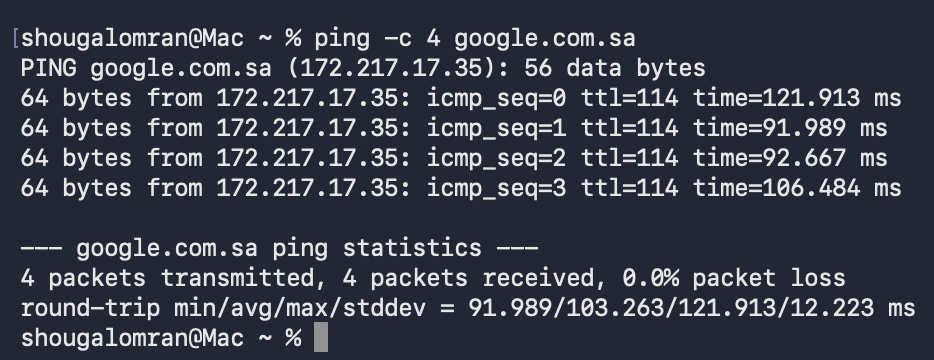
% ping -c 4 google.com.sa
PING google.com.sa (172.217.17.35): 56 data bytes
64 bytes from 172.217.17.35: icmp_seq=0 ttl=114 time=121.913 ms
64 bytes from 172.217.17.35: icmp_seq=1 ttl=114 time=91.989 ms
64 bytes from 172.217.17.35: icmp_seq=2 ttl=114 time=92.667 ms
64 bytes from 172.217.17.35: icmp_seq=3 ttl=114 time=106.484 ms

--- google.com.sa ping statistics ---
4 packets transmitted, 4 packets received, 0.0% packet loss
round-trip min/avg/max/stddev = 91.989/103.263/121.913/12.223 ms
The icmp filter#
Click a filter to apply it to the real frames:
The same three filters in Wireshark:



The two port unreachables#
They are not part of the ping. My Mac sent them to say "nothing is listening on that UDP port", and each one quotes the packet it answers:
- Frame 321 answers a DNS reply from
192.168.1.1:53to port40076. It arrived after the lookup had finished and the port had closed. - Frame 419 answers a UDP packet from
198.41.192.67:7844, a Cloudflare address, to a port that was also closed. Unrelated background traffic.
The icmp filter catches them because ICMP also carries error reports.
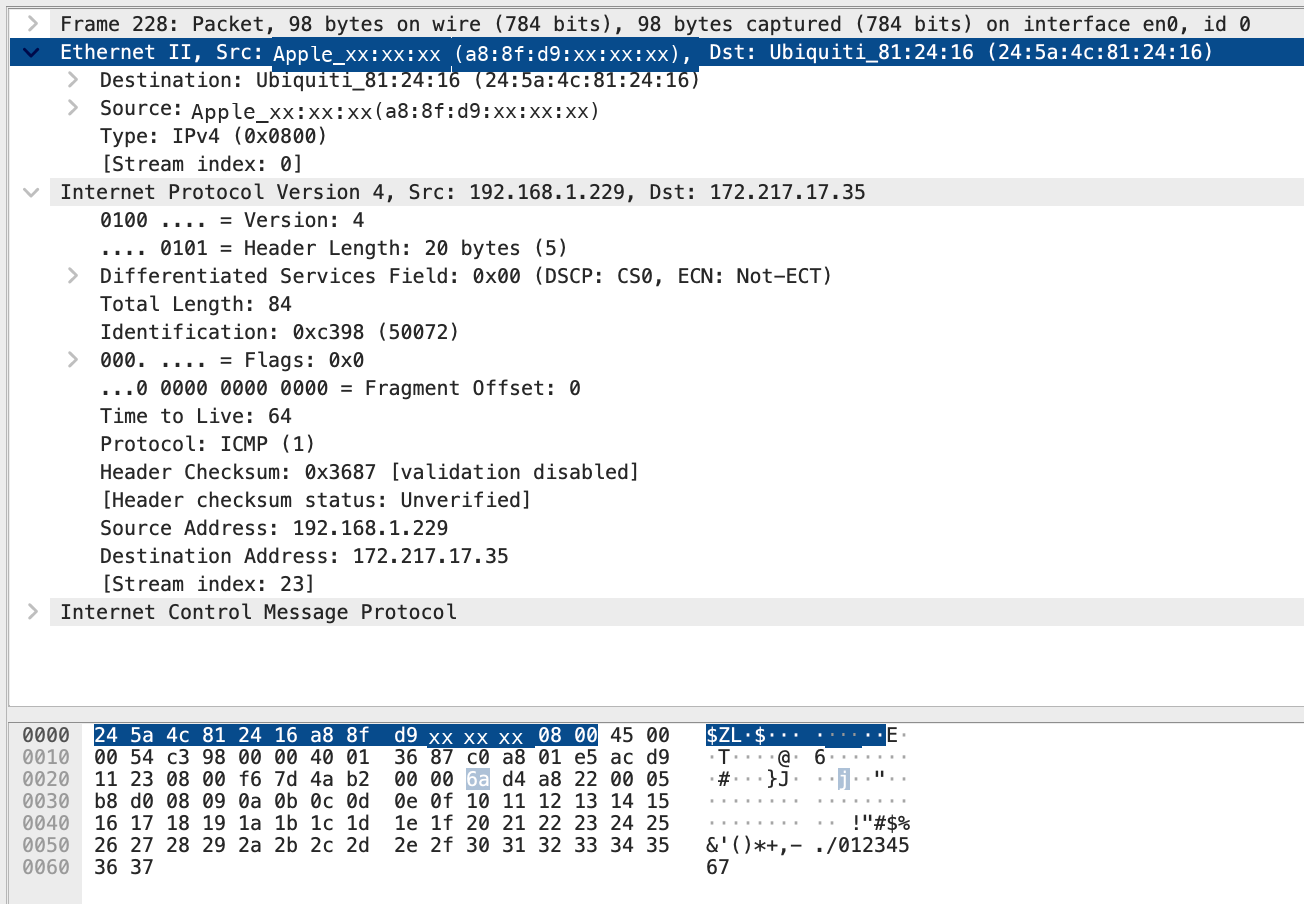
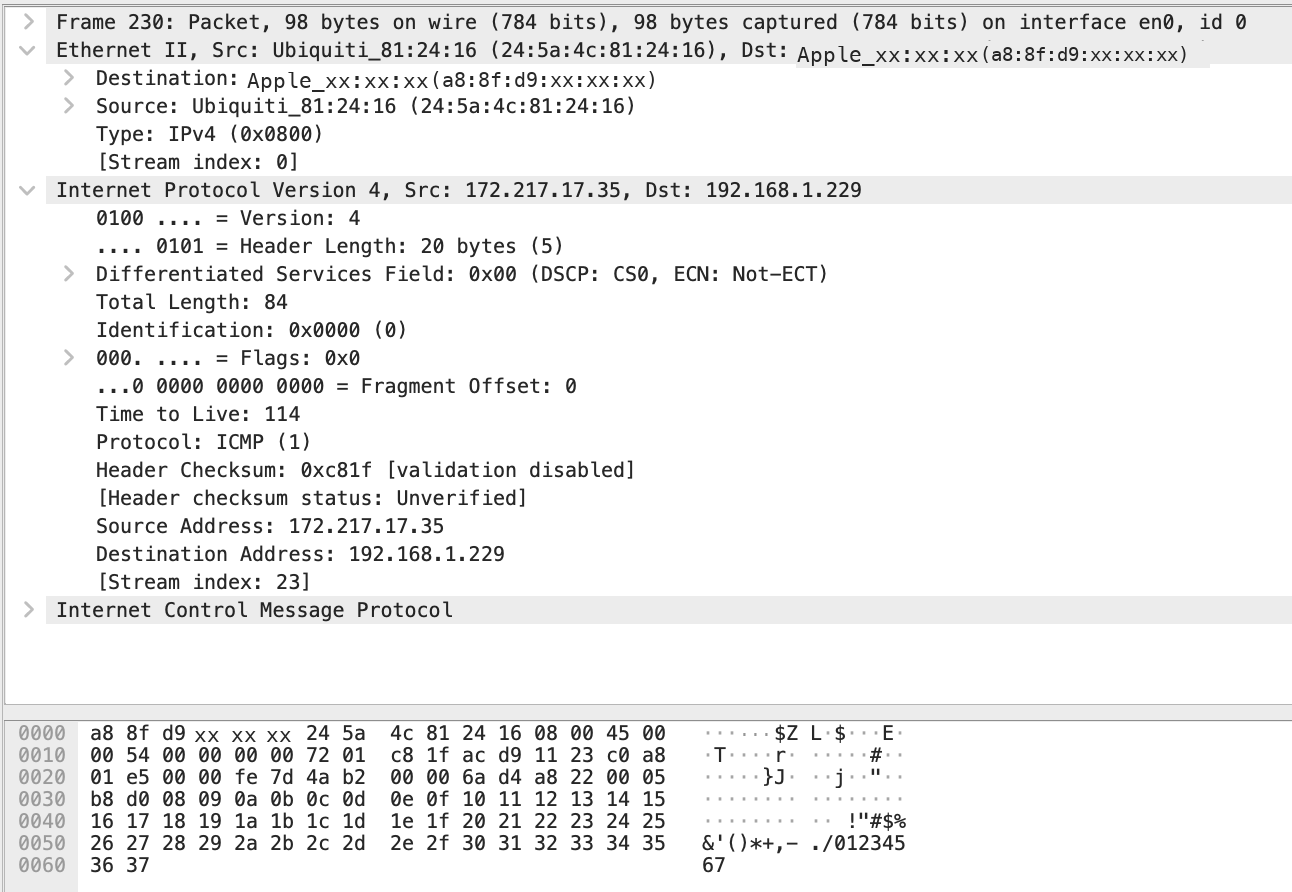
Frame 228, layer by layer#
Frame 228 is the first echo request with my IP as the source.
Is the destination MAC Google's?#
No. It is the MAC of the default gateway, my router. The IP addresses name the two ends: my Mac and Google. The MAC addresses only name the two ends of the current link. Google is not on my Wi-Fi network, so my Mac cannot address a frame to it. It sends the frame to the gateway, whose MAC it learned with ARP. The router strips the Ethernet header, keeps the IP packet, and wraps it in a new frame for the next link. This repeats at every hop.
MAC · Layer 2 · hop by hop#
Changes on every link. In frame 228 the destination is the router, not Google.
IP · Layer 3 · end to end#
Stays the same from my Mac to Google: 192.168.1.229 → 172.217.17.35 (unless NAT rewrites it).
EtherType 0x0800 tells the receiving network card that the payload is IPv4 and should go up to the IP layer.
RTT: two clocks#
| Measurement | Calculation | RTT |
|---|---|---|
| Wireshark, frame 228 → 230 | 10.092348 − 10.013828 s |
78.52 ms |
ping, first reply |
as printed | 121.913 ms |
The tools time different things. Wireshark stamps each packet as it passes the network interface, so the gap between request and reply is close to the real network time. ping is an ordinary program: it reads the clock before handing the packet to the operating system and again after it is woken up with the reply. That also counts the kernel's network stack, socket buffers, and scheduling.
All four pings show where the extra time goes:
| Ping | Wire RTT | ping RTT |
Difference |
|---|---|---|---|
| seq=0 | 78.520 ms | 121.913 ms | +43.393 ms |
| seq=1 | 89.858 ms | 91.989 ms | +2.131 ms |
| seq=2 | 91.275 ms | 92.667 ms | +1.392 ms |
| seq=3 | 104.394 ms | 106.484 ms | +2.090 ms |
The overhead is about 2 ms on the last three pings and 43 ms on the first. The first packet pays one-time costs inside the Mac. Both numbers are right for what they measure, and Wireshark's is the better measure of the network.