Logical topology#
project 1 · logical view
requestreply
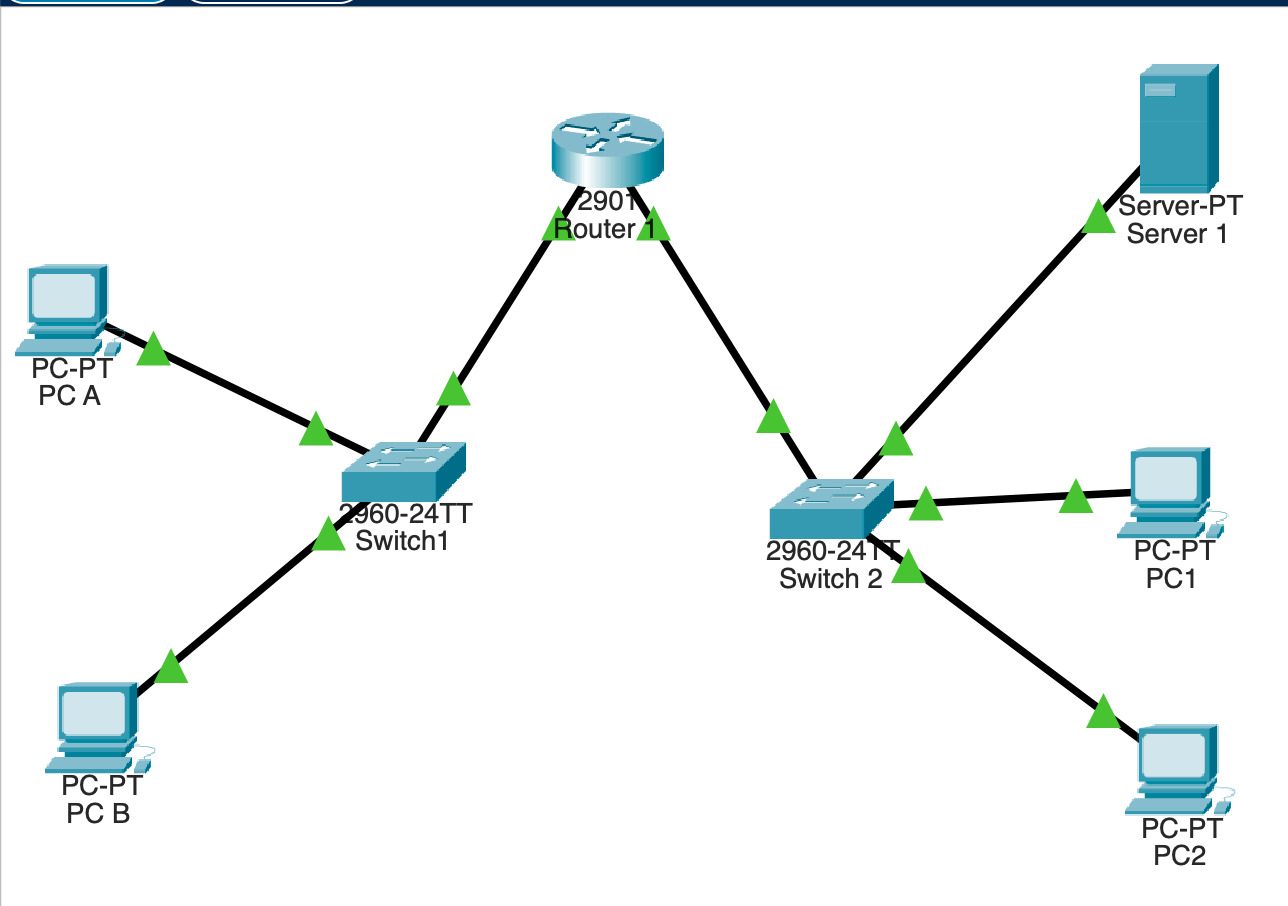
Cabling#
All links are copper straight-through: each one joins an end device or the router to a switch.
| From | Port | To |
|---|---|---|
| R1 | GigabitEthernet0/0 | Switch1 |
| R1 | GigabitEthernet0/1 | Switch 2 |
| PC A | FastEthernet0 | Switch1 |
| PC B | FastEthernet0 | Switch1 |
| PC1 | FastEthernet0 | Switch 2 |
| PC2 | FastEthernet0 | Switch 2 |
| Server 1 | FastEthernet0 | Switch 2 |
Which router port goes to which switch matters
G0/0 is Network A's gateway (.1) and G0/1 is Network B's (.65). If the two uplinks are swapped, each LAN is cabled to a router port on the other subnet. Both ports still show up/up, but nothing crosses. That is what broke the first ping, see Verification. You can try it in the ping lab on the home page.
Switches#
The 2960 switches keep their default configuration, so no setup is needed. Every port is in VLAN 1 and the switch learns MAC addresses as frames arrive. Their job is to forward frames inside each LAN. Anything leaving the LAN is sent to the router's MAC.