Wireshark Packet Capture
and Display Filtering
Reading real packets off a MacBook's Wi-Fi interface, from the Ethernet header to the round-trip time.
Same lab, different OS
The lab sheet was written for Windows. I did it on macOS with the equivalent commands.
| Lab sheet (Windows) | Used on macOS | Why |
|---|---|---|
| ipconfig /all | ifconfig en0 | MAC and IPv4 of the Wi-Fi interface |
| ping -4 | ping -c 4 | Four echoes, then stop |
| — | Private Wi-Fi Address: Off | Show the real hardware MAC, not a random one |
Capturing on en0
% ifconfig en0en0: flags=8863<UP,BROADCAST,RUNNING> mtu 1500 ether a8:8f:d9:xx:xx:xx inet 192.168.1.229 netmask 0xffffff00 status: active
Capture everything. Display what matters.
Illustrative rows. Names are shown in place of server addresses. The filter only hides rows, the capture is unchanged.
Six filters, one capture
httpOnly HTTP: the request and the 200 OK.
ip.addr == 192.168.1.229To or from my Mac.
ip.src == 192.168.1.229Only what my Mac sent.
ip.dst == 192.168.1.229Only what my Mac received.
ip.dst == 192.168.1.229 and httpBoth conditions: HTTP coming in.
dns or httpEither one: each lookup next to its request.

http filter leaves only the HEAD / request and the 200 OK response.PSU only speaks HTTPS
Port 80 does not answer, so curl timed out. HTTPS is encrypted, so the http filter has nothing to show.
For plain HTTP I used neverssl.com.
% curl -I http://neverssl.comHTTP/1.1 200 OK
One name, two correct answers
- Many front ends. Google serves the same site from many addresses.
- Answer depends on who asks. Each resolver gets a server near where it seems to be. The ping used the local answer, 172.217.17.35.
- Anycast. 8.8.8.8 is one address announced from many sites. The nearest one answers.
10 ICMP packets, not 8
The two port unreachables are not part of the ping. My Mac sent them for UDP that arrived on closed ports: a late DNS reply from 192.168.1.1 (frame 321) and a packet from a Cloudflare address (frame 419).

MAC is hop-by-hop. IP is end-to-end.
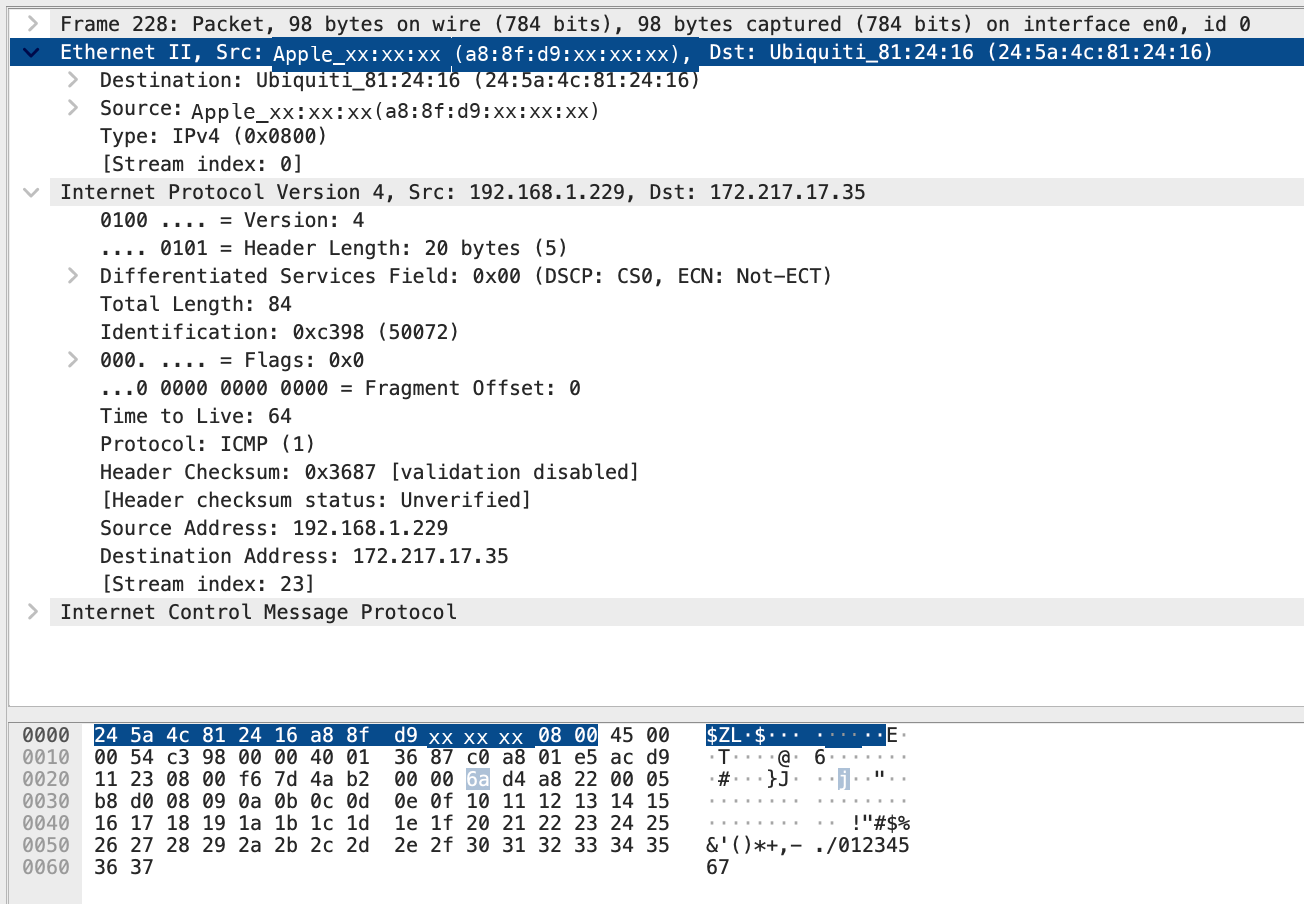
- Frame 228's destination MAC is the router, not Google. Google isn't on my Wi-Fi, so my Mac can only hand the frame to the gateway.
- Each router builds a new frame for the next link. The IP addresses stay the same the whole way.
Reading the Ethernet header
EtherType 0x0800 tells the receiver that the payload is IPv4 and should go up to the IP layer.
78.52 ms on the wire, 121.913 ms in ping
Wireshark stamps packets at the interface. ping times from inside the app, so it also counts the kernel, socket buffers and process scheduling. The extra 43 ms is spent inside the Mac, and only on the first echo: the next three differ by about 2 ms.
What the capture showed
HTTPS hides HTTP
PSU: 53 SYNs to port 80, no reply. neverssl.com gave a readable 200 OK.
DNS depends on who asks
172.217.17.35 locally, 142.250.203.3 via 8.8.8.8. Both are correct.
10 ICMP, not 8
4 + 4 echo, plus 2 port unreachable from my Mac.
Gateway MAC, Google IP
Frame 228 went to 24:5a:4c:81:24:16 but was addressed to 172.217.17.35. 0x0800 = IPv4.
Thank you
Questions?
Shoug Fawaz Abdullah Alomran · CS331 · Ms. Nada ALALYANI