Switch and Router
Network Design
Two LANs, one Cisco 2901 router, a subnetted /24, and a web page served across the router in Cisco Packet Tracer.
The build
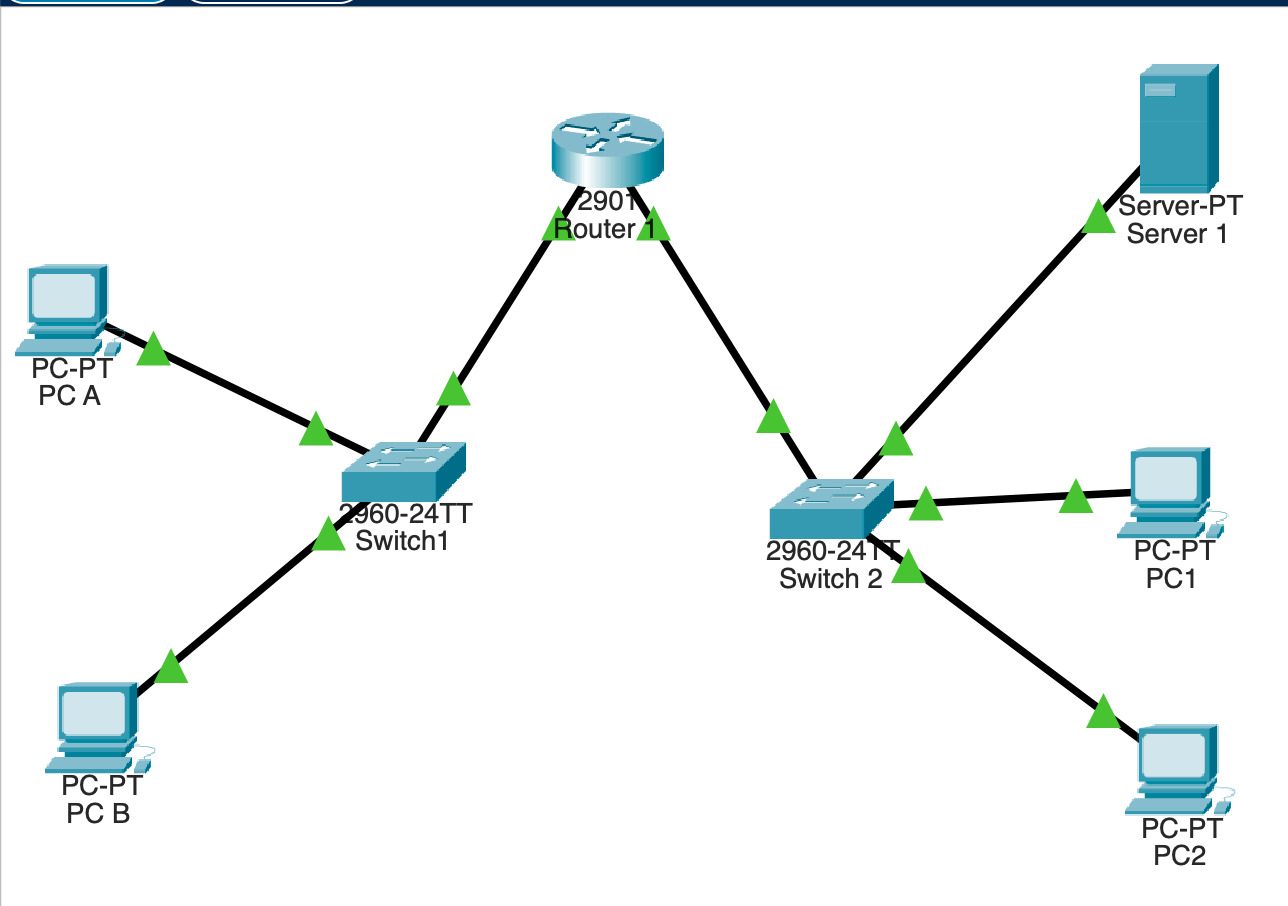
Cisco 2901 router. G0/0 → Network A, G0/1 → Network B.
Two Cisco 2960 switches, one per LAN.
Hosts on Network A.
PC1 and PC2, hosts on Network B.
Server 1: HTTP and HTTPS, with a custom page.
The block to subnet.
R1 is the only path between the LANs. Every packet from Network A to Network B goes through it.
One /24 becomes four /26
bcast .63
bcast .127
bcast .191
bcast .255
last octet of the mask: 11000000 = 192
2 subnet bits · 6 host bits
The numbers
Two networks are needed now. Four leaves two spare /26 blocks for later growth.
Subnet table
| # | Network | Usable | Broadcast | Use |
|---|---|---|---|---|
| 1 | 199.19.30.0/26 | .1 – .62 | .63 | Network A · G0/0 |
| 2 | 199.19.30.64/26 | .65 – .126 | .127 | Network B · G0/1 |
| 3 | 199.19.30.128/26 | .129 – .190 | .191 | Future |
| 4 | 199.19.30.192/26 | .193 – .254 | .255 | Future |
Gateway first, hosts next
| Device | IP | Gateway | Network |
|---|---|---|---|
| R1 G0/0 | 199.19.30.1 | — | A |
| PC A | 199.19.30.2 | .1 | A |
| PC B | 199.19.30.3 | .1 | A |
| R1 G0/1 | 199.19.30.65 | — | B |
| PC1 | 199.19.30.66 | .65 | B |
| PC2 | 199.19.30.67 | .65 | B |
| Web Server | 199.19.30.68 | .65 | B |
Router>enableRouter#configure terminalRouter(config)#hostname R1R1(config)#interface GigabitEthernet0/0R1(config-if)#ip address 199.19.30.1 255.255.255.192R1(config-if)#no shutdownR1(config-if)#exitR1(config)#interface GigabitEthernet0/1R1(config-if)#ip address 199.19.30.65 255.255.255.192R1(config-if)#no shutdownR1(config-if)#endR1#
Configuring R1
- hostname R1. The prompt changes at once.
- One address per LAN, each the first usable address of its subnet.
- no shutdown. Router ports start out administratively down.
Both interfaces up/up
R1#show ip interface briefInterface IP-Address OK? Method Status ProtocolGigabitEthernet0/0 199.19.30.1 YES manual up upGigabitEthernet0/1 199.19.30.65 YES manual up upVlan1 unassigned YES unset administratively down down
First ping: 100% loss
- PC A → PC2 failed: 4 timeouts.
- Pinging PC A's own gateway (.1) failed too.
- So the fault was local: cabling, addressing or the port. Routing wasn't the problem yet.
C:\>ping 199.19.30.67 Request timed out.Request timed out.Request timed out.Request timed out. Packets: Sent = 4, Received = 0, Lost = 4 (100% loss)
The cables were swapped
Switch1 (Network A, gateway .1) was plugged into G0/1 (.65). Switch2 was in G0/0. Each LAN's ARP for its gateway reached a port on the wrong subnet.
Fix: Switch1 → G0/0, Switch2 → G0/1.
Replies with TTL=127
C:\>ping 199.19.30.67Reply from 199.19.30.67: bytes=32 time=32ms TTL=127Reply from 199.19.30.67: bytes=32 time=11ms TTL=127Reply from 199.19.30.67: bytes=32 time<1ms TTL=127Reply from 199.19.30.67: bytes=32 time<1ms TTL=127 Packets: Sent = 4, Received = 4, Lost = 0 (0% loss)
- 4 of 4 replies. The first took 32 ms while ARP learned the MAC addresses, then under 1 ms.
- 128 − 1 = 127: PC2 replies with 128, R1 takes one off. Exactly one router hop.
A web page across the router
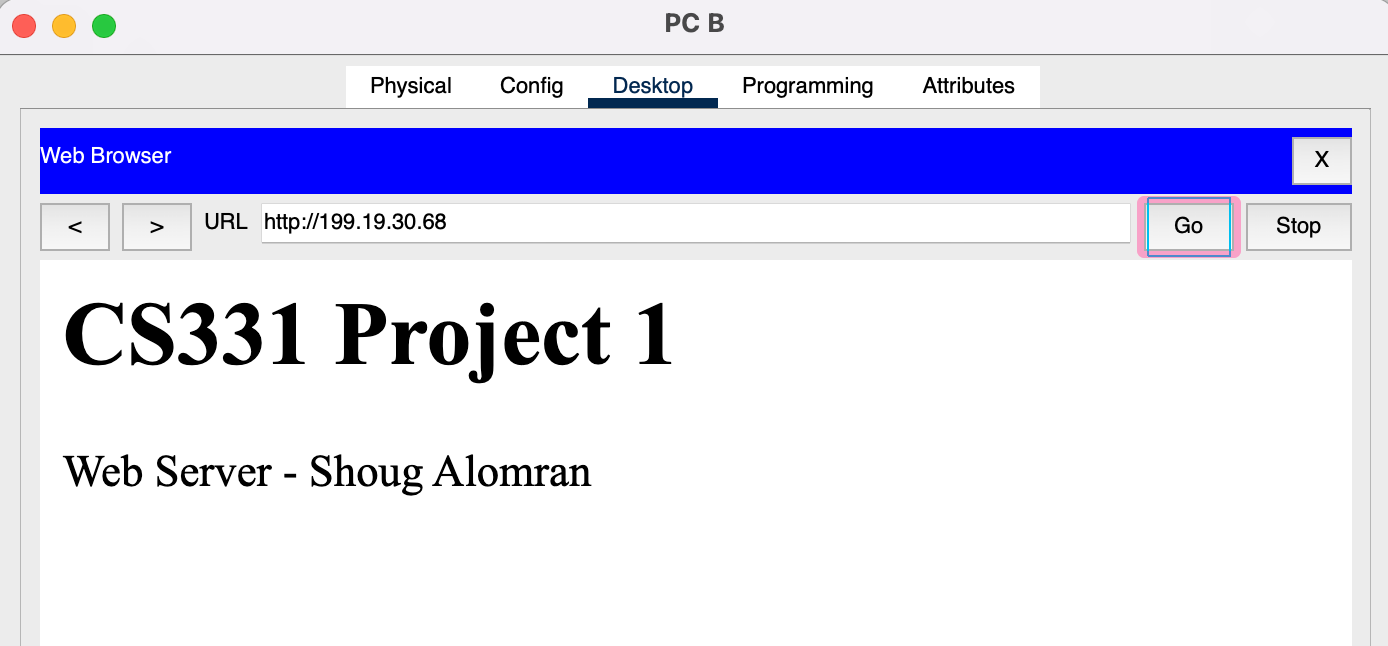
PC B is on Network A and the server is on Network B. Loading the page tests every layer of the design together.
CS331 Project 1
Web Server - Shoug Alomran
What I learned
Subnet first
/26 gives 4 × 62 hosts. Block size 64 makes the boundaries easy to see.
Ping the gateway
If a host can't reach its own gateway, the problem is local. Look at Layer 1 first.
Port ↔ subnet
Up/up only means "cabled". It doesn't mean "cabled to the right subnet".
Read the TTL
TTL=127 from a 128 host means exactly one router hop.
Thank you
Questions?
Shoug Fawaz Abdullah Alomran · CS331 · Ms. Nada ALALYANI